I had a couple of 'nice' pallets lying around and I wanted to make something quick. I had a vision of a 'zombie apocalypse' style first aid cabinet so I set to work.
I ended up with a more traditional colour scheme but the inner graphics are an ode to a famous bearded graphic designer.
It's been a few months since I finished this and all I can really remember is; this project taking so long to complete. It wasn't one thing delaying it either, everything took longer than it should have. Looks and functions well though, so a success, I guess.
Hiatus This article was posted on Sunday, 27th August 2017
It has been a busy summer, and my YouTube experiment had to be put on hiatus. Ironically I'm working on a huge building project that I'm not documenting. I'm not a builder or tradesman so I make stuff in the evenings. I also have two kids. I'm also permanently tired.
Anyway, self-pity aside, I only realised tonight that I didn't post for the third and fourth video on this website, so I will do a quick couple of posts shortly.
I have all my tools at another secret location so I'm trying to get some work done in my workshop to improve it- insulation, electrical, internal walls etcetera. I might do a quick video showing the workshop as it is, as of today. I also got a new camera and I haven't had a chance to test it, so I might kill many birds with one stone.
Storage Box This article was posted on Friday, 24th March 2017
As with all my projects at the moment, I'm making stuff that I need and posting it to YouTube. It's good motivation to finish the projects fully.
I have several items in my home office that have large footprints- for example I have a lightbox that is one about 20mm thick but is 400mm x 600mm. I had a gap under my desk, so I decided to make a storage box on wheels for longer-term storage.
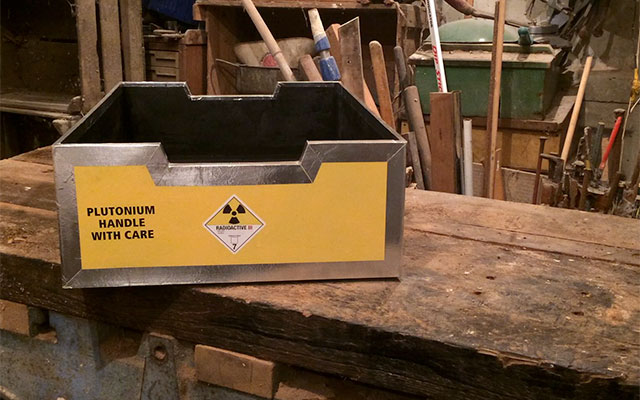
Now I do like to paint-and-decal stuff and I had an idea for this box in mind, and I purchased yellow spray paint as a highlight colour, but I changed my mind last minute and decided to make it have a passing resemblance to the Plutonium storage case in Back to the Future. It always made me laugh, the flippancy of 'Plutonium Handle with Care'.
Notes on the project-
I made the mistake of skipping a second coat of the undercoat and this showed up really badly on the yellow. I made a notation in the video about one million coats later and that number isn't far off. I don't think the 'Painter's Touch' spray paint was too good either, but it's readily available locally. I think I need to have a look for alternative spray paints for future projects.
The Aluminium tape is real duct tape which I dulled down with some steel wool. It's not going to last particularly well with heavy use, but I don't foresee any heavy use with that box. I haven't gone near it since I filled it up.
Tool Tote This article was posted on Tuesday, 7th March 2017
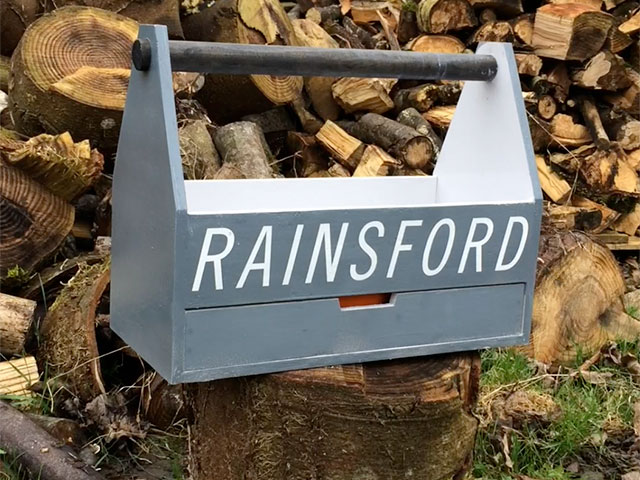
I had a need for a means to cart my tools and other stuff around my garden. I was using an orange B&Q bucket to lug my drill, driver, boxes of screws and anything else I needed, which was far from ideal. I have tool bags and tool boxes but I wanted a tool tote that would remain empty and ready to be filled, depending on the job.
One other feature, or necessity, was that there was a drawer or tray that would let me put shallow objects, like my screw boxes or small tools, separate from the larger tools. I didn't want latches or anything that wuld break or catch, so I turned to magnets.
The more I thought about the idea, the more I thought it would work and it would work well. Being a huge fan of maker videos on YouTube, I decided to record the whole process and make a short video of the making process. The side-effect of making a video is you put extra effort in to the process- my tool tote ended up with a paint job and then I went and stencilled it up. It's a slippery slope. Check out the video-
Notes on the project-
The tool tote works great but is a little bit heavy. I used 12mm plywood for strength and if I was to make another I'd use 12mm again but I'd try reduce the volume of the tote.
I used rare-earth magnets with .8kg pull but it actully wasn't enough. I cut this out of the video for the sake of brevity, but the first time I tried the magnets they didn't hold the empty tray in place. So I prised them out of the bottom plate and put two magnets (stuck together with epoxy) in instead. As I had one .8kg pull magnet per corner in the tray and two .8kg pull magnet in each corner of the bottom plate of the tool tote, I couldn't recommend a specific rate of pull for magnets without doing some testing. Next time.
I used whatever paint I had handy, I think the dark grey was a €1.50 can of primer. Covered pretty well. I used boiled linseed oil on the handle, which was screwed in to place so I can replace it when I break it.
Notes on the video-
I shot it on my iPhone because that's what I have. I think the quality is ok, I used 1920 x 1080p. My workshop has about ten 100w incandescent bulbs which is why there is a yellow hue to everything.
I was going to do a voice over explaining the process but I don't have a decent mic or the time to do a script and record it. I really just wanted to get the video out, so it is what it is.